- All extensions
- DocShift
 DocShift for ChatGPT and Gemini
Export ChatGPT and Gemini chats to Word, formulas and all
Paste an answer into Word and every formula turns into backslashes and dollar signs. DocShift exports the chat to a .docx in which each formula is a real Word equation, tables are tables and code keeps its spacing.
Free: 5 exports a week, in full quality. Pro: $2.99 a month or $19.99 once.
Also installs in Edge and Brave. Firefox version coming soon.

What lands in Word
The same answer from ChatGPT, copied by hand and exported with DocShift.
The sum of the first n squares is:
$$\sum_{k=1}^{n} k^2 = \frac{n(n+1)(2n+1)}{6}$$
LaTeX source that you would have to retype by hand.
The sum of the first squares is:
A Word equation: double-click it to edit.
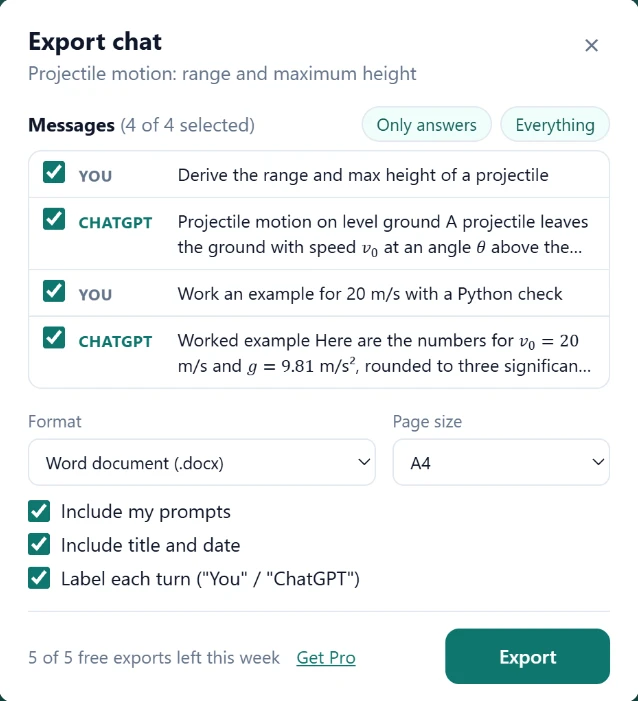
Click Export, pick the messages, pick the format
The Export button sits in the corner of every chat. Take the whole conversation, only the answers, or just the messages you tick, and choose whether your prompts, the title and the date go in.
- Word (.docx), PDF, Markdown, HTML and plain text
- Headings become Word heading styles
- Saved straight to your Downloads folder
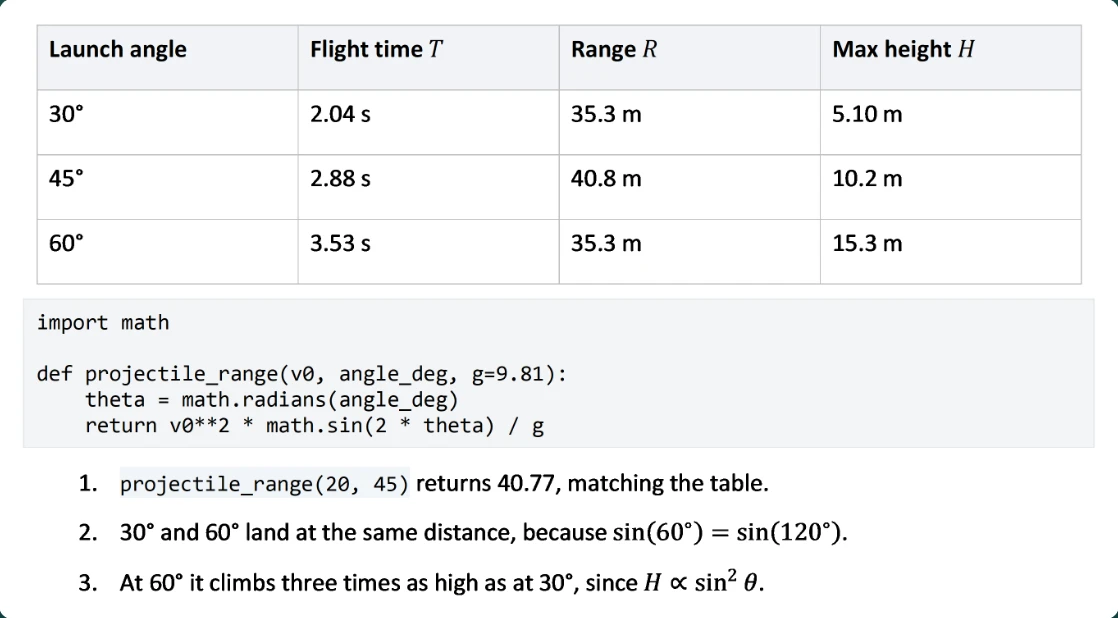
Tables, lists and code come out right
Tables arrive as real Word tables, numbered and bulleted lists keep their nesting, and code keeps its indentation in a monospace font. Fractions, integrals, sums, matrices and aligned steps all become native equations.
- Built on the chat’s data rather than its page layout, so a ChatGPT redesign does not break your exports
- Long Gemini chats are loaded in full before the export
Privacy
- Works only on ChatGPT and Gemini
- It has no access to the other sites you visit.
- Converted on your computer
- The conversation goes from the chat site straight to a file in your Downloads folder. It is never sent to us.
- No account, no tracking
- No analytics. The only other request is the Pro check with the payment service.
Pricing
Five exports a week cost nothing. If you export more, upgrade from inside the extension.
Free
$0
No account, no card.
- 5 exports a week, reset every Monday
- Every format, in full quality
- Equations, tables and code included
Pro
$2.99a month
or $19.99 once: a one-time payment, updates included
- Unlimited exports
- Document styling: font, size, margins, header and footer
- Everything in Free
Install it, then choose Get Pro in the export window. Checkout by Stripe; cancel the monthly plan any time; 14-day money-back guarantee.
Questions about DocShift
Are the equations pictures?
No. Each formula becomes a native Word equation. Double-click it in Word to edit it, as if you had typed it there.
What happens after 5 exports in a week?
The export window tells you, and the count starts again on Monday. Pro removes the limit.
Is my conversation uploaded anywhere?
No. It is converted in your browser and saved on your computer. On ChatGPT, DocShift asks chatgpt.com for the open conversation with the session you are already signed in with; nothing goes to us.
Can I open the file in Google Docs?
Yes. Open the .docx in Google Docs and the equations come across as Google Docs equations.
Does the PDF keep the formulas sharp?
Yes. The formulas are text, not pictures, whether you export a PDF from DocShift or save the Word file as PDF.
Do I have to subscribe?
No. Pro is $2.99 a month or $19.99 once. Either way you can ask for a full refund within 14 days.
Your next chat, as a proper document
Five exports a week are free, with no account.
Also installs in Edge and Brave. Firefox version coming soon.